
Most people hear an inverter beep and assume the battery is dead, so they reach for the charger and nothing changes. A beep can also point to overload, loose cables, heat, or a fault. Switch off nonessential loads, check the battery charge and cable connections, let the unit cool, and read the manual for your exact model before you restart it.
Quick answer
An inverter beeps to warn of low or high battery voltage, too much AC load, poor battery connections, overheating, or an internal fault. Unplug your appliances first, then check battery voltage, terminals, and airflow. Restart only after you remove the cause.
- Not every beep means low battery. Overload, loose cables, heat, and faults all trigger alarms.
- Beep timing and LED codes differ by manufacturer. Your manual decides what a pattern means.
- Remove the loads before you troubleshoot. It is the fastest way to tell a battery alarm from an overload alarm.
- Thin, long, or loose battery cables can cause repeated alarms even when the battery is full.
- After a long overload, some inverters will not restart by themselves. You may need a manual power cycle.
- Hot cables, smoke, sparks, or a swollen battery are emergencies. Stop and disconnect safely.
- What does it mean when my inverter beeps?
- What should I do if my inverter is beeping?
- How can I tell whether the beep means low battery or overload?
- Low-battery and high-battery alarms
- Why does my inverter beep when I plug in an appliance?
- Can loose or undersized battery cables make an inverter beep?
- Overheating and blocked ventilation
- Fault, short-circuit, grounding, and polarity warnings
- What should I do if my inverter is beeping continuously?
- How do I reset an inverter after it beeps or shuts down?
- Why does the inverter keep beeping after the battery is charged?
- When is inverter beeping dangerous?
- How to stop the beeping from coming back
- Frequently Asked Questions
What does it mean when my inverter beeps?
A beep is a warning that something is outside the inverter’s safe range. It is usually battery voltage, AC load, temperature, or a wiring problem. The alarm exists to give you time to act before the unit shuts down.
The catch is that there is no universal code. One brand uses a beep every second for a battery warning. Another uses the same pattern for overheating. Victron’s Phoenix manuals, for example, describe one beep per second as a low or high battery voltage warning and two beeps per second as an impending overload shutdown. That is one maker’s rule, not a standard. You can read the details in the Victron error indications page.
What should I do if my inverter is beeping?
Unplug or switch off every appliance connected to the inverter, then watch what the inverter does. If the beeping stops, the load was the problem. If it keeps going, the cause is on the battery side, in the cables, in the heat, or inside the unit.
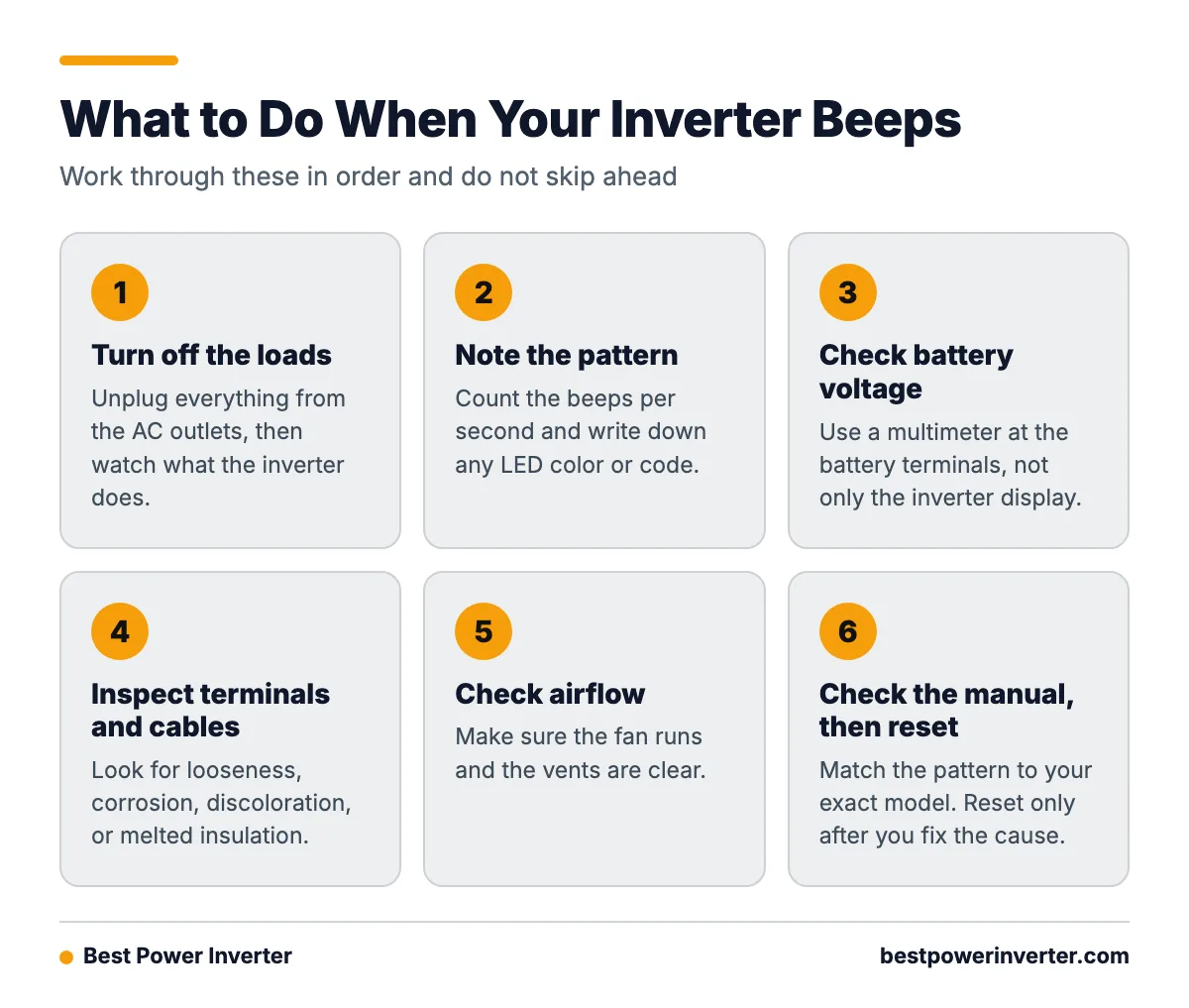
Work through this order. Do not skip ahead.
- Turn off the loads. Unplug everything from the AC outlets.
- Note the pattern. Count the beeps per second. Write down any LED color or code.
- Check battery voltage. Use a multimeter at the battery terminals, not only the inverter display.
- Inspect the terminals and cables. Look for looseness, corrosion, discoloration, or melted insulation.
- Check airflow. Make sure the fan runs and the vents are clear.
- Look up the pattern in your manual. Match it to your exact model.
- Reset only after you fix the cause.

- If the beep stops when you unplug the loads: the load is too big or has a high startup surge. Go to the overload section.
- If it keeps beeping with no loads and the battery reads low: charge the battery and check the charger or solar input.
- If the battery reads normal but the beep returns when loads start: suspect loose, long, or thin cables.
- If the case or fan area feels hot: let it cool and clear the vents.
- If you see a red fault LED with no clear cause: check the manual, then contact the maker.
- If you see smoke, smell burning, or feel hot cables: stop. Go to the safety section.
How can I tell whether the beep means low battery or overload?
Remove the loads. A low-battery alarm usually continues with nothing plugged in. An overload alarm usually stops once the extra load is gone. Then compare the pattern to the table below.
Treat this table as a starting point only. Every row is model-dependent.
| Symptom | Common cause (model-dependent) | First check |
|---|---|---|
| One beep per second | Low or high battery voltage warning (this is how Victron Phoenix manuals describe it) | Battery voltage at the terminals, charger or solar output |
| Two beeps per second | Overload, with shutdown close (Victron Phoenix example) | Unplug the biggest loads |
| Continuous beeping | Serious alarm such as severe overload, overheating, or a fault | Switch off loads, check temperature, read the manual |
| Red alarm LED | Active fault or protection trip | Match the LED code to the manual |
| Shutdown after beeping | Battery voltage, load, or heat reached the limit | Find the cause before restarting |
| No output, no beep | Very heavy overload, blown fuse, or tripped breaker | Check fuses and DC connections |
Low-battery and high-battery alarms
A low-battery alarm means the battery voltage fell near the inverter’s cutoff. A high-battery alarm means voltage rose too far, often from a charger or solar controller set too high. Both can damage the battery or the inverter if ignored.
Thresholds depend on the model. One Victron Phoenix manual lists shutdown below 0.88 times the nominal battery voltage or above 1.3 times nominal. On a 12 V system that works out to about 10.56 V on the low side and 15.6 V on the high side. Do not copy those numbers to another brand. Look up your own cutoff in the Phoenix inverter manual or your own product’s manual.
For a low-battery beep, do this:
- Charge the battery, or turn off AC loads so the battery can recover.
- Measure voltage at the battery posts with a multimeter.
- Check that cable connections are tight and the cables are the right size. Victron recommends both.
- Test the battery. An old battery can show a decent resting voltage and then drop fast under load.
For a high-battery beep, check the charger, alternator, or solar controller settings. Make sure the charge profile matches your battery type, such as lead-acid or lithium.
Why does my inverter beep when I plug in an appliance?
The appliance probably asks for more power than the inverter can give, at least for a moment. Motors and compressors pull a burst of power at startup, called surge or inrush current. That burst can be several times the running watts.
Fridges, freezers, pumps, air compressors, and power tools are the usual culprits. Resistive heaters have no big surge, but they pull their full wattage the whole time. Kettles, toasters, and space heaters can overload a small inverter instantly.
Victron documentation says an overload warning means the AC load is above the inverter rating, and it recommends reducing the load.
Worked example: a small refrigerator
These numbers are an example only. Check the label on your own appliance.
- Fridge running power: 150 W
- Fridge startup surge: about 600 W for a moment (assumed for this example)
- Inverter: 300 W continuous rating
The fridge runs at 150 W, which looks fine for a 300 W inverter. But at startup it asks for roughly 600 W, double the inverter’s rating. The inverter beeps, and it may trip off.
A better pick would have a continuous rating comfortably above the running load of everything you use at once, and a surge rating above 600 W. A 1000 W unit with a higher surge rating would handle this. Add up the loads that run together, not just one.
Battery current matters too. Watts divided by volts gives amps. At 12 V, a 600 W surge pulls about 50 A, and more once you add inverter losses. That current has to travel through your cables, which brings us to the next cause.
Can loose or undersized battery cables make an inverter beep?
Yes. Loose, corroded, thin, or overly long DC cables cause voltage drop. When the inverter pulls current, voltage at its input sags below the cutoff, and it sounds a low-battery alarm even though the battery itself is fine.
Common cable problems include:
- Loose terminals. They add resistance and heat. Tighten them to the torque in your manual.
- Corrosion. White or green crust on terminals blocks current. Clean it off.
- Cable too thin. Use the gauge your manual specifies for your inverter’s wattage and cable length.
- Cable too long. Longer runs lose more voltage. Keep the inverter close to the battery.
- Bad crimps or lugs. A poor crimp can look fine and still run hot.
There is another cause that is easy to miss: DC voltage ripple. Victron troubleshooting information says that low-battery and overload indications showing together can point to excessive ripple at the battery connection. One listed threshold is above 1.5 V RMS. Ripple often comes from weak cables, poor connections, or a worn battery. A meter that can read AC ripple on the DC side will show it.
Overheating and blocked ventilation
Inverters make heat as they convert power. If they cannot shed it, the unit warns you, reduces output, or shuts down. A hot case, a stuck fan, or a blocked vent is a clear sign.
Check these points:
- Vents are not covered by bags, blankets, or gear.
- The fan spins when the unit is hot. A fan that never starts needs service.
- The inverter is not in direct sun or a closed, hot compartment.
- Dust is not packed into the vents.
- You are not running it near its full rating for hours.

Switch the inverter off and let it cool. Fix the airflow problem, then restart. If it overheats again with good airflow and a light load, the unit may have an internal problem.
Fault, short-circuit, grounding, and polarity warnings
Some beeps point to wiring or internal faults. Examples include a short circuit on the AC output, a grounding fault, reversed battery polarity, or an internal failure. These usually come with a red LED or an error code.
- Short circuit. A damaged cord or faulty appliance can trigger it. Unplug everything and test again with no load.
- Reversed polarity. Connecting positive to negative can destroy an inverter in seconds. Many units have a fuse that blows first. Never replace it with a bigger one.
- Grounding problems. Follow your manual’s grounding steps. Wrong grounding can cause alarms and shock risk.
- Internal fault. If the alarm returns with no load, good cables, and a charged battery, contact the maker.
What should I do if my inverter is beeping continuously?
Switch off all loads, then switch the inverter off if you can do so safely. Continuous beeping often means a more serious alarm than a single warning beep. Check for heat, smell, and cable temperature first.
If everything looks normal, work through the checklist above: battery voltage, terminals, cable size, ventilation, then the manual. Do not keep restarting the unit over and over. Each restart into the same fault can add stress to the inverter and battery.
If the beeping stays on with no load, a good battery, and clean connections, stop and call the manufacturer or a qualified technician.
How do I reset an inverter after it beeps or shuts down?
Remove the cause first, then power cycle the unit by turning it off, waiting, and turning it on again. Resetting without fixing the problem just brings the alarm back.
- Switch off and unplug all AC loads.
- Fix the cause: charge the battery, tighten cables, clear vents, or let the unit cool.
- Turn the inverter off. Wait the time your manual states. A minute is common, but check.
- Turn it on with no load connected.
- Confirm the alarm is clear and battery voltage looks right.
- Add loads back one at a time, biggest last.
Note that after a prolonged overload, some Victron inverters shut down and do not restart on their own. Victron says the cause must be removed before you switch the unit off and back on. Details are in the VE.Direct inverter operation and troubleshooting page. Other brands may use a button, a remote switch, or a different wait time.
Why does the inverter keep beeping after the battery is charged?
A full battery does not fix the other causes. The beep may come from overload, voltage drop in the cables, ripple, heat, or a fault. A battery can also read full at rest and then sag under load if it is worn.
Check these in order:
- Measure voltage at the inverter input while it runs a load.
- Look for loose or corroded terminals.
- Confirm cable gauge and length match the manual.
- Unplug loads to rule out overload.
- Check for a high-voltage alarm from the charger or solar controller.
- Look at your model’s error table for a latched fault that needs a manual reset.
When is inverter beeping dangerous?
A beep alone is a warning, not an emergency. It becomes dangerous when it comes with hot wiring, a burning smell, smoke, sparks, melted insulation, or a swollen battery. Those signs mean stop right away.
Normal warning: steady beeping, cool cables, no smell, alarm stops when you remove loads or charge the battery.
Emergency: hot or soft cables, discolored terminals, smoke, sparks, a swollen or leaking battery, or a burning smell. Switch off loads only if you can do it safely, disconnect the power source if it is safe to reach, move people away, and call a qualified technician or emergency services. Do not keep testing.
Also stop if the inverter trips repeatedly with the same fault, or if you are unsure about wiring, fuses, or grounding. Large battery banks can deliver very high current. A wrong move can cause burns or fire.
How to stop the beeping from coming back
- Size for startup surge. Add up the running watts of everything used together, then check the biggest surge. Pick an inverter that covers both with margin.
- Match battery capacity to the load. A small battery with a big inverter sags fast. Make sure the battery can supply the current.
- Use the right cables. Follow the manual’s gauge and length limits. Keep runs short.
- Fuse the DC line as the manual directs.
- Give it air. Leave clearance around the vents and keep the fan clean.
- Check every few months. Look at terminal tightness, corrosion, cable condition, and battery voltage.
- Keep the manual. Save a photo of the alarm table on your phone.
Frequently Asked Questions
What to do if inverter is beeping?
Unplug or switch off all loads, then note the beep pattern and any LED. Check battery voltage, terminals, cables, and ventilation. Look up the pattern in your model’s manual. Restart only after you remove the cause.
What to do if inverter is beeping continuously?
Turn off all loads and check for heat, smoke, or hot cables. If you see any of those, stop and call a qualified technician. If not, check the battery, cables, and airflow. If it still beeps with no load, contact the manufacturer.
Why is my inverter beeping?
The usual reasons are low or high battery voltage, too much AC load, loose or undersized cables, overheating, or an internal fault. The beep timing and LED code help narrow it down, but they differ by brand and model.
What does it mean when my inverter beeps?
It means the inverter detected a condition outside its safe limits and is warning you. Some models also shut down if the condition continues. Use your manual to read the exact pattern for your unit.
Why does the inverter keep beeping after the battery is charged?
Overload, cable voltage drop, DC ripple, heat, or a latched fault can all trigger alarms even with a full battery. Measure voltage at the inverter while it runs, inspect connections, and try a power cycle after removing the cause.
Sources