
Most owners make the same mistake: they open the inverter case to look for the problem. Don’t. Start on the outside instead. Read the display, write down the fault code, check the breakers and isolators, clear the vents, and follow the maker’s exact restart steps. Anything inside the enclosure should be left to a qualified solar technician.
Quick answer
You can safely check the display, monitoring app, breakers, isolators, vents, and load, then restart using the manual’s exact steps. Internal repair involves dangerous AC and DC voltage. If a fault returns after one restart, or involves ground faults, damage, or burnt smell, call a technician.
- Best for a one-time fault: external checks and a manual-based restart
- Best for repeat faults: authorized service or a certified technician
- Record the model, serial number, fault code, time, and weather before you touch anything.
- Shutdown and restart order is model-specific. Follow your manual, not a generic video.
- Ground fault, insulation fault, damage, or burnt parts mean stop and call a professional.
- Many inverters can be repaired, but parts, age, and warranty decide if they should be.
- Good evidence (screenshots, photos, fault history) speeds up support and warranty claims.
- When is it unsafe to open or repair a solar inverter?
- What should I check when my solar inverter displays an error code?
- How do I troubleshoot a solar inverter that is not producing power?
- Symptom decision table
- Why does my solar inverter keep disconnecting from the grid?
- What should I do if the inverter shows a ground fault, insulation fault, or PV overvoltage warning?
- How can I diagnose overheating, fan failure, overload, or short circuit?
- Can I reset a solar power inverter myself?
- What will a technician test?
- Can a solar inverter be repaired, or does it need to be replaced?
- How do I confirm the fix worked?
- Preventive maintenance
- What do owners say?
- Frequently Asked Questions
When is it unsafe to open or repair a solar inverter?
It is unsafe any time you would need to remove the cover or touch internal parts. An inverter handles high DC voltage from the panels and AC voltage from the grid. Capacitors can also hold stored energy after the unit is switched off. Arc-flash is a real risk.
Manufacturers say the same. Tesla states that installing and servicing its solar inverter requires knowledge of high-voltage electricity, that its components are not user-serviceable, and that owners must not open, disassemble, repair, tamper with, or modify the unit. Its safety instructions also require disconnecting the inverter from all voltage sources before work, and warn against using a unit that is cracked, broken, damaged, or malfunctioning.
Stop and call a professional if you see any of these:
- A cracked, melted, or scorched case
- A burning smell or visible soot
- Water inside the enclosure or on the wiring
- A ground fault or insulation fault message
- Switches that are stuck, hot, or damaged
- The same fault returning after a restart
What should I check when my solar inverter displays an error code?
Write the code down exactly, then look it up in your model’s manual. Do not guess from a general list. The same number can mean different things on different brands.
Before you do anything else, collect this evidence:
- Inverter model and serial number (from the label)
- Exact fault code and message, plus the time it appeared
- Weather at the time: heat, storm, heavy cloud, or cold morning
- Production data from the monitoring app, with screenshots
- Recent changes: new appliances, added panels, battery work, or roof work
- Photos of the inverter, the AC breaker, and the DC isolator
This list matters later. Support teams and installers can often tell more from fault history than from one error on the screen. It also backs up a warranty claim. Manufacturer support centers, such as SMA America Support, typically offer manuals, error-code lookup, and service requests, so have your serial number ready.

How do I troubleshoot a solar inverter that is not producing power?
Work from the outside in. Check the grid, then the AC side, then the DC side, then the inverter’s own status. Each step takes a few minutes and needs no tools.
- Grid availability. Is the house itself powered? Grid-tied inverters shut down when the utility is off. This is by design.
- AC breaker. Look at the breaker that feeds the inverter. If it has tripped, note it. Do not keep flipping it back on.
- DC isolator. Make sure the PV switch is in the ON position. Photograph it.
- Display and app. Read the status and the fault history.
- Heat and airflow. Is the inverter hot? Are the vents blocked?
- Monitoring link. A lost Wi-Fi connection can look like zero production even when the inverter is working. Check the unit’s display against the app.
Worked example: an inverter with no output
Here is how one diagnosis might go. This is an illustration, not a real customer case.
- The app shows zero output at noon on a clear day.
- The house lights work, so the grid is available.
- The AC breaker is on. The DC isolator is on.
- The display shows an overtemperature message. The fault history shows the same message at the last three midday peaks.
- The inverter sits behind stored boxes. The vents are covered. The owner clears the space, waits for the unit to cool, and restarts it per the manual.
- Output returns. Next day, the fault does not repeat. The case is closed.
Now change step 4. The display shows a ground fault or insulation fault instead. The owner stops there, does not restart, and books service with the screenshots and photos in hand. Same symptom, very different path.
Symptom decision table
Use this table to separate what you can check from what needs a technician.
| Symptom | Safe homeowner checks | Technician-only tests | Likely causes | Stop-work condition |
|---|---|---|---|---|
| No output, display dark | Grid power, AC breaker, DC isolator | DC voltage and AC supply tests | Tripped breaker, open isolator, failed supply | Burnt smell or damage |
| Error code on display | Record code, check manual | Component checks | Varies by model | Code points to internal fault |
| Keeps disconnecting from grid | Note times, check other loads | Grid voltage and frequency logging | Grid voltage or frequency out of range, loose connections | Heat at connections |
| Ground or insulation fault | Record only, no restart loops | Insulation and grounding tests | Damaged cable, moisture, panel fault | Always stop |
| Overtemperature or fan alarm | Clear vents, check shade and clearance | Fan and thermal checks | Blocked airflow, failed fan, heat | Alarm returns after cooling |
| Overload or short circuit | Unplug large loads | Output wiring and load tests | Too much load, faulty appliance or wiring | Breaker trips instantly |
| No data in app | Check router and cables | Communication module check | Wi-Fi loss, settings, module fault | Display also shows faults |
Why does my solar inverter keep disconnecting from the grid?
Usually because the grid voltage or frequency left the allowed range, so the inverter shut itself off to protect the system. Manufacturer manuals list grid disconnection as its own fault category.
Write down when it happens. If it is the same time each day, a nearby load or a utility voltage swing may be the cause. If it only happens at peak sun, heat may be involved. Loose connections at the AC terminals can also cause drops, but checking them means opening the wiring compartment, which is technician work.
Owners also report repeated grid disconnections on some systems. When the pattern continues after one restart, send your logs to support or the installer. The utility may need to check its supply.
- If the fault happens once and clears: record it and watch for a repeat.
- If it repeats at the same time daily: log the times and contact the installer.
- If the whole house also flickers: call the utility.
- If you see heat marks or smell burning: switch off at the labeled points and call a technician.
What should I do if the inverter shows a ground fault, insulation fault, or PV overvoltage warning?
Stop. Do not restart the inverter in a loop and do not touch the array wiring. Record the message and call a qualified technician.
A ground or insulation fault means current may be leaking from the PV circuit to ground. Common causes include a damaged cable, a wet connector, or a faulty panel. The cause can sit anywhere along the array, so finding it needs insulation and grounding tests. SMA’s troubleshooting documentation includes checking the PV system for ground faults and points users to model-specific event messages and procedures.
PV overvoltage is different. Panel voltage rises in cold weather, so a string that is too long can exceed the inverter’s input limit on a cold, bright morning. If the warning appears after you or someone added panels, tell the installer. Do not rewire strings yourself.
How can I diagnose overheating, fan failure, overload, or short circuit?
Start with what you can see and hear. These faults often have simple outside causes.
- Overtemperature: Look for blocked vents, dust, direct afternoon sun, or tight clearance. Clear the area and let the unit cool before a restart.
- Fan failure: Listen for a fan that does not start, or one that grinds. A failed fan usually needs replacement by a technician.
- Overload: Unplug large appliances and see if the alarm clears. This applies mostly to inverters with a backup output.
- Output short circuit: Disconnect loads from the inverter’s output. If it trips again with nothing connected, the wiring or inverter needs testing.
- Battery undervoltage: On battery systems, check the state of charge and that battery breakers are on. Do not open the battery enclosure.

If an alarm comes back soon after cooling or unloading, the cause is not just the environment. Book service.
Can I reset a solar power inverter myself?
Yes, if the manual describes a reset for owners and the fault is not a safety fault. The key rule: use your model’s exact procedure. Switch order, isolation points, and waiting times differ between brands and models.
FIMER’s user manual tells users to isolate the inverter from both the grid and the PV array, using the relevant AC and DC switches or breakers, before troubleshooting. Other makers use different steps.
How do I safely shut down and restart a solar inverter?
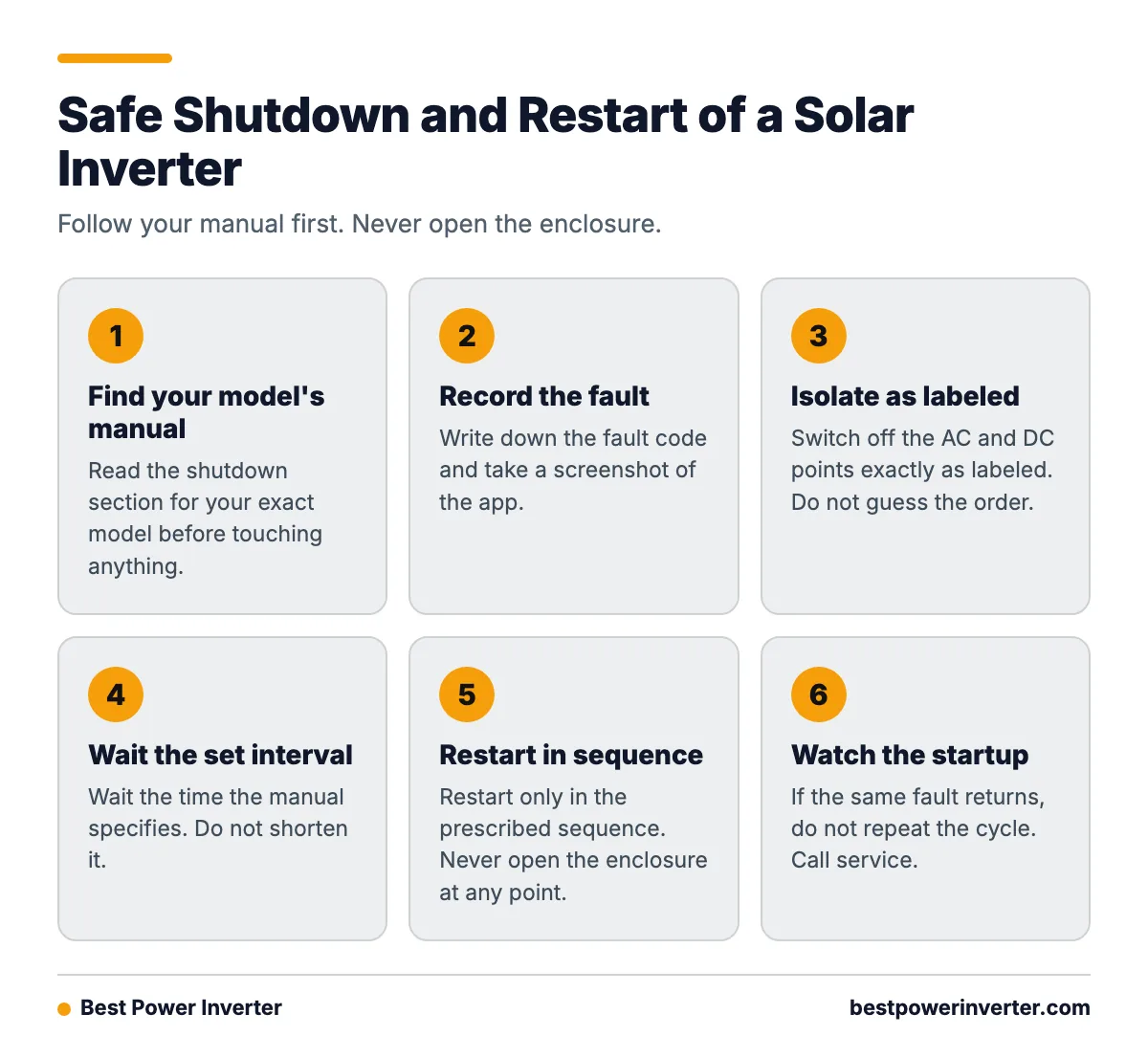
Use this checklist, and let your manual override anything here.
- Find the manual for your exact model. Read the shutdown section.
- Record the fault code and take a screenshot of the app.
- Isolate the inverter exactly as labeled. Do not guess the order.
- Wait the interval the manual specifies. Do not shorten it.
- Do not open the enclosure at any point.
- Restart only in the prescribed sequence.
- Watch the startup. If the same fault returns, do not repeat the cycle.
Some manuals say a persistent fault after restart should go to the manufacturer’s service department rather than be reset again and again. That advice protects you and the hardware.
What will a technician test?
A qualified technician uses meters and test gear to check what you cannot. Expect voltage checks on the DC and AC sides, insulation resistance tests on the PV circuit, grounding and continuity checks, and thermal checks for hot spots. They will also check fans, connections, and communication parts, and read the full event log.
Bring your notes. A technician who can see fault history, screenshots, and photos of the isolators starts several steps ahead. That can cut down on time on site.
Can a solar inverter be repaired, or does it need to be replaced?
Often it can be repaired. Fans, communication modules, and some boards are replaceable on many models. But repair only makes sense if parts exist, the warranty or price supports it, and the fault is not likely to return.
Owners do report cases where a fault was diagnosed correctly but internal parts were not available, so the whole unit had to be replaced. Ask about part availability before you approve any work.
How much does solar inverter repair cost compared with replacement?
Prices vary by brand, size, region, and labor rates, so get written quotes for both. Use this worksheet to compare them.
| Question | Points toward repair | Points toward replacement |
|---|---|---|
| Warranty status | Still covered | Expired |
| Inverter age | Fairly new | Near or past typical service life |
| Quoted parts and labor | Well below the replacement price | Close to the replacement price |
| Part availability | In stock, short wait | Discontinued or long wait |
| Expected downtime | A few days | Weeks without production |
| Fault history | First failure | Repeated failures |
| Efficiency and features | Still meets your needs | Newer unit adds monitoring or battery support you want |
A simple way to score it: count how many rows lean each way. Also add the cost of lost solar production while you wait. If most rows point to replacement, or the repair quote is near the price of a new unit, replacing is usually the cleaner choice. If the warranty is active, contact the manufacturer first. Do not pay for repairs that the warranty covers.
How do I confirm the fix worked?
Watch the full startup and the first day of operation. Do not assume a clean restart means the problem is gone.
- The inverter goes through its normal startup sequence.
- It connects to the grid and stays connected.
- Output rises and falls with sunlight in a normal pattern.
- No alarms appear on the display or in the fault history.
- Monitoring data flows to the app without gaps.
Check again after a hot afternoon and after the next sunny morning. Many faults show up only at the temperature or voltage extremes.
Preventive maintenance
Most prevention is simple and outside the case.
- Keep the clearance around the inverter that the manual requires.
- Wipe dust from the exterior vents. Do not open the case to clean inside.
- Inspect the inverter, conduit, and switches after storms, from a safe distance.
- Check monitoring weekly for unusual dips or gaps.
- Apply firmware updates as the maker instructs.
- Schedule periodic professional servicing, especially for older systems.
What do owners say?
Owners like
- Responsive technical support that helps interpret fault codes and fix configuration problems.
- Remote monitoring and support teams that can spot faults without an immediate site visit.
- Warranty replacements that arrive promptly when a hardware failure is confirmed.
Common complaints
- Long stretches without production while waiting for parts or warranty service.
- Repeated grid disconnections and recurring hardware or software faults.
- Trouble reaching support, slow replies, and poor communication during repairs.
- A correctly diagnosed fault that still ends in full replacement because internal parts are unavailable.
Summarised from owner reviews and long-term user reports; individual experiences vary.
Frequently Asked Questions
How to repair solar power inverter?
Repair starts outside the case. Record the fault code, check the grid, AC breaker, DC isolator, vents, and loads, then shut down and restart using your manual’s exact steps. Internal repair involves hazardous voltage and is for qualified technicians or authorized service centers only.
How to fix solar power inverter?
Match the fix to the cause. Clear blocked vents for overheating, unplug heavy loads for overload, restore a tripped breaker only once, and check the app for communication faults. If the fault returns, or involves a ground fault, insulation fault, or damage, stop and call a professional.
Can solar inverters be repaired?
Yes, many can, depending on the model and parts supply. Fans, communication modules, and some boards may be replaced by a technician. If parts are discontinued, the warranty has ended, or failures keep repeating, replacement is often the better choice.
Sources