
Inverter capacitors can hold a dangerous charge, so opening the case is the last step. To repair an inverter welder with no power, check the outlet, breaker, plug, cable, switch, connections and thermal light first. If it stays dead, unplug it and call an authorized technician.
Quick answer
Work from the wall to the machine. Test the outlet, breaker, plug, cord and switch, then let the welder cool and check its thermal light. If it is still dead, the fault is inside.
- Best for DIY: plugs, cords, switches, clamps, fans
- Best for a technician: boards, IGBTs, capacitors
- “No power” and “no arc” are different problems. Separate them before you touch anything.
- Thermal shutdown is normal protection, not a failure. One manufacturer says to wait 15 minutes before switching on again.
- Outlets, breakers, plugs, cords, switches, clamps and holders are cheap and safe to check from the outside.
- Do not open the case unless you are trained. Capacitors can stay charged after unplugging.
- Board, IGBT and transformer faults usually cost more to fix than they are worth on a budget machine. Get a quote first.
- Safety first: what not to do
- Why is my inverter welding machine completely dead with no display or fan?
- How do I check whether the outlet, breaker, fuse, plug, and power cable are causing the problem?
- How can I tell if the welder has overheated?
- What should I inspect if the machine has power but will not make an arc?
- Can a failed switch, fan, rectifier, capacitor, IGBT, or PCB be repaired?
- How do I tell an external problem from an internal board failure?
- When should I stop and call a service center?
- How to prevent power problems
- Frequently Asked Questions
Safety First: What Not to Do
Unplug the welder before you do anything else. Then keep the case closed. An inverter machine turns mains power into DC, stores it in large capacitors, and then switches it at high speed. Those capacitors can hold energy after the plug is out.
OSHA’s resistance welding rule, 1910.255, shows how seriously stored energy is treated. For high-voltage capacitor-discharge welding equipment, it requires enclosures, interlocks, and ways to interrupt and discharge the capacitors. Your inverter is a different type of machine. The lesson still applies: stored charge does not vanish when the cord is pulled.
Why Is My Inverter Welding Machine Completely Dead With No Display or Fan?
A fully dead machine usually has no incoming power, a bad switch or cord, or an internal supply fault. Start by sorting what you see. The lights, fan and display tell you where to look.
| Symptom | Likely causes | Who fixes it |
|---|---|---|
| No display, no fan, no light | Dead outlet, tripped breaker, blown fuse, bad plug or cord, failed power switch, failed internal supply | You for the first five; technician for the last |
| Display on, no fan | Jammed or failed fan, loose fan wire, fan control fault | Technician, or you if the fan is easy to see and the maker allows it |
| Alarm LED on | Thermal protection, overload, wrong supply voltage | You (cool down and check supply); technician if it persists |
| Fan runs, no welding output | Bad earth clamp, holder or torch, loose cable, internal output fault | You for cables; technician for boards |
| Shuts down after a while, then restarts | Overheating, blocked air flow, undersized cord, voltage drop | You |
Write down what you see before you start. “No light at all” and “alarm light on” lead to very different repairs.
How Do I Check Whether the Outlet, Breaker, Fuse, Plug, and Power Cable Are Causing the Problem?
Test the outlet with another tool, then look at the breaker, plug and cord in that order. Most “dead” welders fail this part of the check. Follow these steps and stop at step 10.
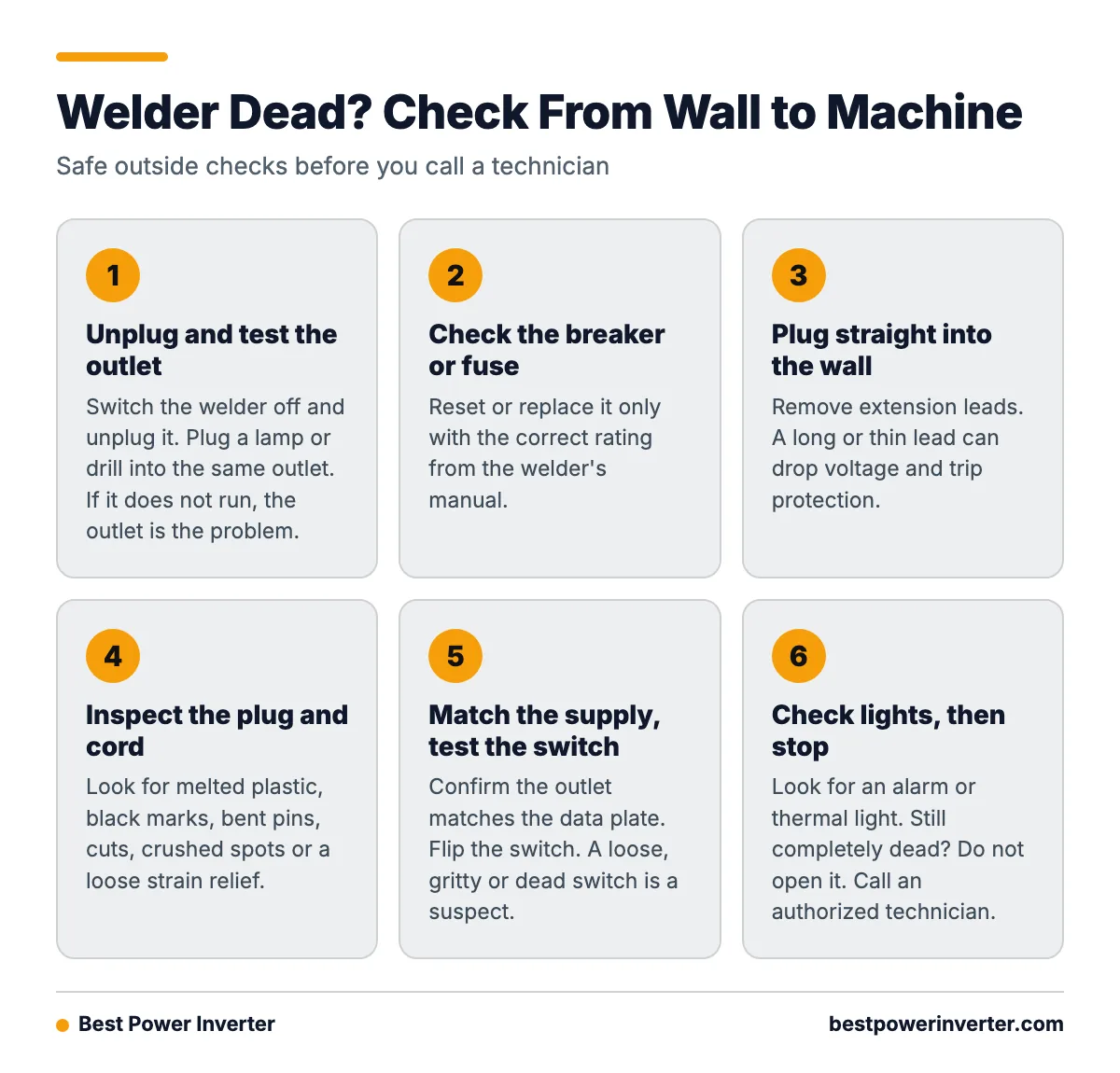
- Switch the welder off and unplug it.
- Plug a lamp or drill into the same outlet. If it does not run, the problem is the outlet.
- Check the breaker or fuse for that circuit. Reset or replace it only with the correct rating from the welder’s manual.
- Remove extension leads. Plug straight into the wall. A long or thin lead can drop voltage and trip protection.
- Look at the plug. Check for melted plastic, black marks, bent pins or loose screws.
- Run your hands along the cord. Look for cuts, crushed spots, and a loose strain relief where it enters the case.
- Confirm the supply matches the data plate. A 120 V outlet will not run a 240 V machine, and the reverse can trip an overload alarm.
- Flip the power switch several times. A switch that feels loose, gritty or dead is a suspect.
- Check for an alarm or thermal light and listen for the fan.
- Stop here. If the machine is still completely dead, do not open it. Take it to an authorized technician.

How Can I Tell If the Welder Has Overheated and Activated Its Thermal Protection?
Look for a yellow or red thermal indicator, a fan that is running hard, and a case that is hot to the touch. Manufacturer manuals describe thermal protection as a normal condition. It cuts power when the welder goes past its operating temperature. It is a safety feature, not a broken machine. The Truper inverter welder manual covers this behavior for its models.
How Long Should I Let an Overheated Inverter Welder Cool Before Restarting It?
Wait at least 15 minutes. That is the figure one manufacturer gives in its manual. Other brands may differ, so check yours. Keep the machine plugged in with the switch on if the manual allows it, so the fan can keep cooling it. Do not block the vents or spray water on the case.
If the light clears after the rest, the machine is fine. The cause is usually heavy use, a duty cycle that was too long, dust in the vents, or poor air flow.
Worked Example: Shutdown, 15 Minutes, Restart
Here is how the logic works. A welder stops during a long run of passes. The thermal light is on and the fan is loud. The owner switches it off, moves it away from a wall, and waits 15 minutes. The light goes out and it welds again.
That points to thermal protection, not a board failure. A failed board does not heal itself after a rest. The fix is shorter welding periods, cleaner vents and more space around the machine. If it trips again quickly after a full cooldown, then dust, a blocked fan or an internal fault becomes more likely.
What Should I Inspect If the Machine Has Power but Will Not Make an Arc?
Check the work path first: earth clamp, electrode holder or torch, and every cable end. If the display is on but there is no arc, the machine has power. The problem is now “no output,” which is a different diagnosis from “no power.”
How Do Loose Earth, Electrode-Holder, Torch, or Interconnection Cables Cause an Inverter Welder to Stop Working?
A welder needs a complete circuit. The current leaves through the holder or torch, crosses the arc, and returns through the work and earth clamp. Any break or high-resistance joint stops the arc or makes it weak. Manufacturer troubleshooting lists a faulty switch, overheating, undersized cable, poor holder-to-cable resistance, and loose or dirty connections among the causes.
Check these points:
- Earth clamp: Clamp onto bare metal. Grind off paint, rust and scale.
- Dinse or panel connectors: Push in fully and twist to lock. Loose plugs get hot and lose output.
- Electrode holder: Open the jaws and check the cable screw. Dirt and corrosion add resistance.
- TIG torch or MIG gun leads: Look for kinks, cracked insulation and a loose trigger plug.
- Connector faces: Clean rust and dirt off with a wire brush or contact cleaner. Truper’s inverter welder manual recommends checking external connections and cleaning rust from them.
- Electrode: A damp or damaged rod, or the wrong polarity, can look like a dead machine.
If you can, swap in a known-good lead set. If the arc returns, you found the fault for the price of a cable.
Can a Failed Power Switch, Fan, Potentiometer, Rectifier, Capacitor, IGBT, or PCB Be Repaired?
Yes, most can be repaired or replaced, but the work and the cost vary a lot. A technical service manual for an inverter welder lists loose or damaged interconnection cables, failed hall sensors, damaged IGBTs, faulty inverter boards and missing low-voltage supplies as internal possibilities. The same manual shows a 24 V DC supply test at the primary inverter board for a torch-trigger circuit. That tells you internal test points are model-specific. A guide from one machine does not fit another.
| Part | Repair type | Relative cost | Who should do it |
|---|---|---|---|
| Plug, power cord | Replace | Low | Owner (if confident), or electrician |
| Earth clamp, holder, leads | Replace | Low | Owner |
| Power switch | Replace | Low to medium | Technician (requires opening the case) |
| Fan | Replace | Low to medium | Technician |
| Potentiometer, knob board | Replace | Medium | Technician |
| Rectifier, DC bus capacitors | Replace | Medium to high | Technician only |
| Control PCB, inverter PCB | Replace or board repair | High | Technician only |
| IGBTs, main transformer | Replace | High | Technician only |
Repair or Replace?
Use a simple rule. Cheap external parts are almost always worth fixing. For boards, IGBTs and transformers, get a written quote and compare it to a new machine of the same class. On an entry-level welder, a large board repair can cost close to a new unit. On a higher-end multiprocess machine, repair usually makes sense. Also ask about parts supply. Without a board number or service manual, a repair may not be possible at all.
How Do I Distinguish an External Wiring Problem From an Internal Inverter-Board Failure?
Work outward-in. If power reaches the plug and the cord, switch and cables are good, the fault is internal. This decision tree helps you place the problem.
- Other tools work in the outlet? No: fix the outlet or breaker. Yes: go on.
- Plug and cord look damaged or hot? Yes: replace them. No: go on.
- Thermal or overload light on? Yes: cool for the time in the manual, check vents and supply voltage. No: go on.
- Display or fan works but no arc? Yes: check clamp, holder, torch and connectors. Swap leads if possible.
- Completely dead after all of this? Stop. The fault is inside. Send it to a technician.
A qualified technician will then follow a meter-based path. With the machine unplugged and the capacitors safely discharged, they check cord and switch continuity. They confirm mains reaches the input board, check the rectifier, then look for the low-voltage supplies that power the control board. A missing low-voltage supply explains a dead display. Only after that do they test the inverter board and IGBTs. Live testing, if needed, is done by trained staff with proper tools and the service manual.
When Should I Stop and Take It to an Authorized Service Center?
When Is It Unsafe to Open the Welder or Test Voltage Inside It?
It is unsafe any time you lack electrical training, the service manual, or proper insulated tools. Unplugging does not make the inside safe, since capacitors can hold a charge. Do not open the case if:
- You are not trained to discharge and verify capacitors.
- You do not have the maker’s service documentation for your model.
- The machine is still under warranty. Opening it may void the warranty.
- You see burn marks, smell burnt plastic or hear a pop when it is powered.
Take the machine to a service center when it is dead after the outside checks, when the overload light stays on after cooling, when the breaker trips on every start, or when it trips again soon after a full rest. These signs point to a fault inside the machine, not in the supply.
How to Prevent Power Problems
- Respect the duty cycle. Rest the machine before it shuts itself down.
- Keep vents clear. Leave space around the case. Remove dust with dry, low-pressure air from the outside, with the machine unplugged.
- Inspect cables often. Look for cuts, melted spots and loose ends.
- Use the right supply. Match voltage and breaker rating to the data plate. Avoid long extension leads.
- Keep connections clean. Wipe rust and dirt off clamps and plugs. The Truper mini inverter welder manual is a good example of the care instructions makers give.
- Store dry. Moisture and dust shorten the life of boards.
Frequently Asked Questions
How to repair inverter welding machine no power?
Unplug it, then check the outlet, breaker or fuse, plug, power cord and power switch. Look for a thermal or overload light and let the machine cool. If it is still dead, the fault is inside, likely the switch, rectifier, capacitors, control board or inverter board. Take it to an authorized technician.
How to repair inverter welding machine?
Start with the cheap, external parts: plug, cord, clamp, holder, torch and cable connectors. Clean rust and tighten loose joints. For internal parts like boards, IGBTs and capacitors, use a trained technician and the service manual for your model, since stored energy inside is dangerous.
Inverter welder not working. What should I check first?
Decide whether it has no power or no arc. With no power, check the outlet, breaker, plug, cord and switch. With power but no arc, check the earth clamp, electrode holder or torch, and every cable connection. Also check for a thermal or overload light.
How long should I let an overheated inverter welder cool before restarting it?
One manufacturer’s manual says to wait 15 minutes. Check your own manual, since times can differ. If the thermal light returns soon after a full cooldown, clean the vents and have it checked.
Is it safe to open the welder after unplugging it?
Not for an untrained person. Inverter capacitors can hold a dangerous charge after the plug is out. Leave internal work to a qualified technician.
Sources