
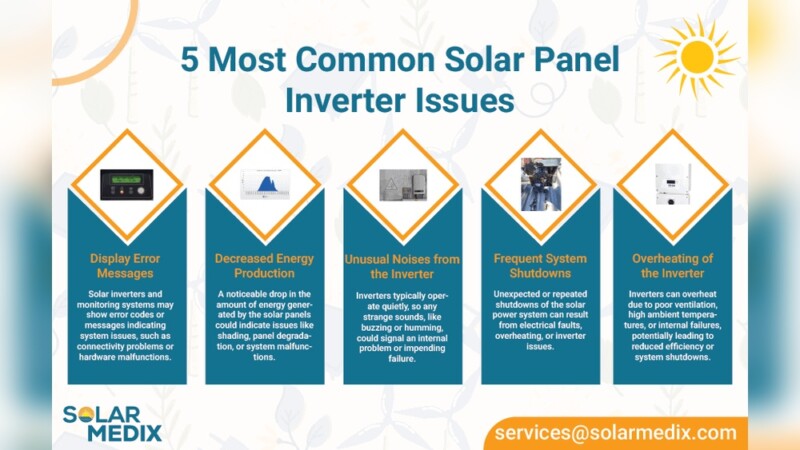
Common solar inverter problems include grid voltage or frequency faults, ground (insulation) faults, overheating, DC overvoltage or polarity errors, overloads and monitoring failures. Owners can safely record the fault code, look at the indicators, confirm that permitted external breakers are on and follow the manufacturer’s restart procedure. Internal testing and repairs belong with a qualified professional, because PV equipment can stay energized even when the inverter looks dead.
Quick answer
Photograph the display, write down the exact fault code and time, and check visible external switches. Then follow your manual’s restart steps once. If the fault returns, or involves ground, insulation, DC or burning smells, stop and call your installer or a solar electrician.
Safety rules before troubleshooting a PV inverter
Solar conductors and equipment can remain hazardous during troubleshooting. Safety guidance calls for isolation procedures such as lockout/tagout and warns against acting directly on a faulty inverter. The panels keep producing voltage whenever there is light, so switching off the AC side does not make the DC side safe.
SMA’s important safety instructions say not to operate the inverter’s AC or DC load-break switch while it shows an error, and to use an external PV disconnection device where one is fitted. Other makes may differ, so read your own manual first.
- Never open the inverter enclosure or touch cables and terminals.
- Do not work in wet conditions or with water on or around the unit.
- Insulated gloves do not make live PV wiring safe to handle. Treat them as a precaution, not permission.
- Do not operate disconnects during an active fault unless your manual says to.
- Switch off and call a professional if you smell burning or see scorching, swelling, melted plastic or water inside.
What an owner may check and what needs a professional
| Homeowner-safe | Qualified electrician only |
|---|---|
| Photograph the display and record the code and time | Measuring AC or DC voltage |
| Check visible external AC breaker and isolator positions | Insulation resistance testing |
| Look for obvious heat, water or pest damage without opening the unit | Opening the inverter enclosure or combiner box |
| Clear dust and obstructions from outside vents | Repairing or replacing cables, connectors and terminals |
| Follow the manual’s restart procedure once | Disconnecting live DC strings |
| Check Wi-Fi router and app status | Replacing the inverter or its internal parts |
What does a solar inverter fault code mean?
A fault code is the inverter’s shorthand for the condition it detected, such as grid voltage out of range, low insulation or overtemperature. The meaning is manufacturer-specific, so the same number can mean different things on different brands. PV inverter manuals commonly direct users to record the displayed message or fault code before taking further action.
Error messages on the display warn of problems inside the inverter, and these codes help identify faults quickly. Note the code and check the manual. Brand pages such as the SolaX inverter fault code guide show how a manufacturer lists codes, but always match the code to the manual for your exact model before resetting anything.
Homeowner-safe checklist
- Photograph the display, including any lit or flashing indicators.
- Write down the exact code, the date and the time.
- Note the weather, whether it was sunny, hot or wet, and whether the grid had an outage or storm.
- Check that the external AC breaker and any permitted isolators are on.
- Inspect for obvious heat, water damage, nests or insects without opening the unit.
- Follow the manual’s restart procedure once and watch the display.
- If the fault returns, contact the installer or manufacturer support with your notes.
Quick symptom-to-cause table
| Symptom | Likely causes | Safe owner action | Escalate when |
|---|---|---|---|
| No output, screen on | Grid outage, AC breaker off, grid voltage out of range | Check the AC breaker and whether other appliances have power | Breaker trips again or the code persists |
| No output, screen blank | AC or DC supply lost, night, tripped breaker | Check daylight and visible external switches | Still blank in daylight with switches on |
| Intermittent output | Grid fluctuations, heat, loose connection, shading | Log times and conditions of each stop | Pattern repeats over several days |
| Red fault light | Any protective fault | Record the code, check the manual, restart once if permitted | It returns or involves ground, DC or insulation |
| High-temperature warning | Hot ambient air, blocked vents, direct sun | Clear vents, add shade only if the manual allows | Warning continues in mild weather |
| Low insulation or ground fault | Moisture, damaged cable, failed connector | Document weather and when it occurs | Immediately, since this is technician-only |
| Monitoring offline | Wi-Fi change, router, firmware, dongle | Check the router and app, then the inverter’s own display | Display itself shows a fault |
Common inverter issues
Overheating can damage the inverter and lower its performance. Dust and poor airflow cause heat to build up. Clean dust filters and keep vents clear.
Unusual noises like buzzing or clicking may mean loose parts or electrical issues. Strange sounds should be checked by a technician.
Frequent shutdowns stop energy flow and can harm connected devices. They may be caused by overheating or wiring problems.
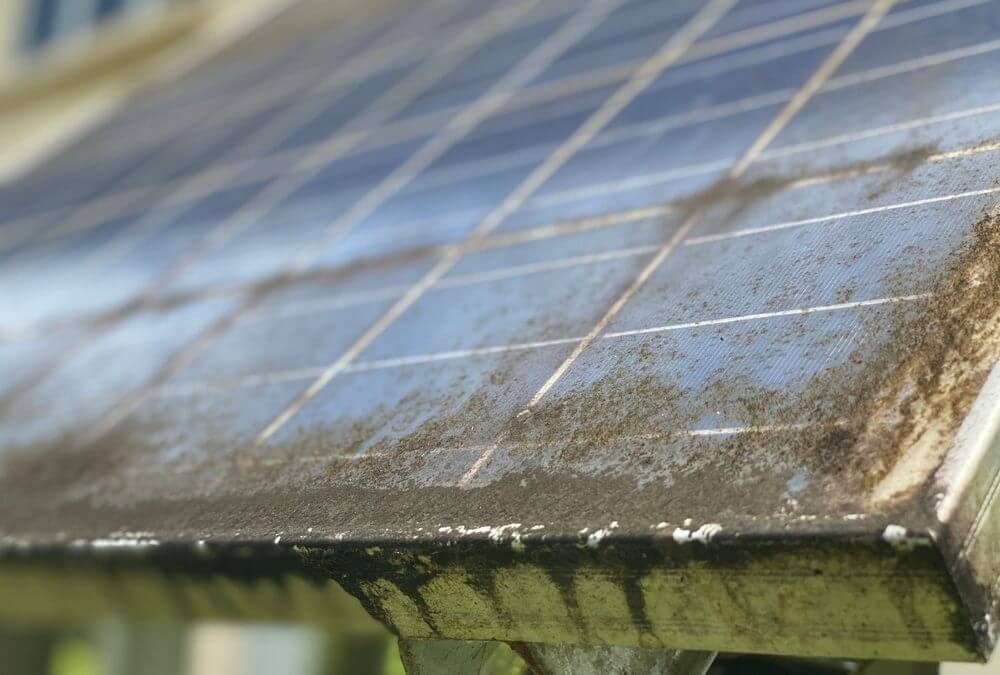
Reduced energy output means the inverter is not converting power well. This can result from dirty panels, shading, or internal faults.

Why is my solar inverter not producing power?
The usual reasons are a grid problem, a switched-off or tripped AC breaker, a DC-side fault, or simply no light on the panels. Work from the outside in.
- Check the display. A fault code points to a protective shutdown, while a blank screen suggests lost supply.
- Confirm the grid is up. Manufacturer troubleshooting procedures commonly require checking grid availability, AC voltage, AC terminations, breaker operation and cable connections. Owners can verify the first and the breaker position; the voltage and termination checks are for an electrician.
- Look at the monitoring app, but treat it as a second opinion, because an offline app does not prove the array stopped.
- If the screen is dark in good daylight with external switches on, call your installer.
Why does my inverter keep shutting down and restarting?
Repeated cycling usually comes from grid conditions drifting out of range, heat, or a loose or degraded connection. Frequent shutdowns may be caused by overheating or wiring problems.
Log each event with time, weather and code. If stops cluster in the afternoon heat, suspect temperature. If they cluster when neighbours’ systems are busiest, suspect grid voltage. If they follow rain, suspect moisture and a ground fault. Some manufacturer guidance recommends updating firmware and restarting the inverter to see whether a fault is intermittent, but persistent faults should go to support or an installer.
What causes a grid voltage or frequency fault?
The inverter disconnects when utility voltage or frequency leaves the allowed window, to protect people and equipment. Common grid-related fault categories include grid voltage or impedance too high, grid voltage too low, and frequency or utility-loss conditions.
- No utility: a local outage or tripped breaker. Check whether other circuits have power.
- High voltage or impedance: often seen in sunny midday hours when many neighbouring systems export power, or when AC wiring is undersized or has a poor termination.
- Low voltage: heavy local load or a weak supply.
- Frequency errors: usually a grid event, and typically clear on their own.
A single brief fault that clears is normally a grid event. Repeated high-voltage faults need your installer and, if the supply is at fault, the utility. Voltage readings and AC terminal checks are electrician work.
How do I fix a solar inverter ground or isolation fault?
You do not fix it yourself. A ground or insulation fault means current may be leaking from the PV circuit to earth, usually through moisture, damaged cable insulation, a failed connector or a pest-chewed wire. Because the DC side stays live in daylight, this is technician-only work.
Ground or insulation faults are investigated by checking insulation resistance. One Fox ESS manual specifies that impedance between PV positive, PV negative and ground should be greater than 1 MΩ; see the Fox ESS F Series user manual. Other makes publish their own thresholds, so a technician should use the figure in your manual.
Worked example: isolating a low-insulation fault one string at a time
This is an illustration of the method, not a real case. Say an inverter with three PV strings shows a low-insulation code every morning after rain, then clears by afternoon.
- Homeowner: photographs the display, records the code and the times, and notes that it follows wet weather. The owner does not disconnect any DC connectors.
- Technician: follows lockout/tagout, isolates the inverter and tests the whole array’s insulation resistance against the manual’s minimum, such as the 1 MΩ figure in the Fox ESS manual.
- Technician: separates string 1, string 2 and string 3 and tests each on its own. Suppose strings 1 and 2 pass and string 3 reads far below the limit.
- Technician: follows string 3’s cabling and connectors, looking for a cracked cable jacket, a water-filled connector or a conductor rubbing on metal, then repairs or replaces it and retests the string.
The owner’s notes are what make step 2 quick: a rain-linked, morning-only fault points to moisture ingress. For the general method, an electrical testing guide for ground-fault testing in PV systems explains how testers approach it.
Why is my solar inverter overheating?
Overtemperature faults can result from excessive ambient heat or inadequate ventilation. Dust blocks vents, stopping air from cooling parts, which makes components hot and can lead to failure.
- Check that the space around the inverter is clear and that vents and fans are free of obstructions.
- Look at whether afternoon sun now falls on the unit. Inverters need to be installed in dry, shaded areas with good airflow to work well.
- Note whether the warning appears only on the hottest days, which suggests a placement or ventilation issue rather than a failing part.
- If a fan is silent, or warnings persist in mild weather, ask the installer to inspect it.
Avoid covering or boxing in the unit to hide it, since that makes heat worse.
What should I do if the inverter shows a DC overvoltage, polarity, or string fault?
Record the code and leave it to a professional. These faults involve live DC wiring, which is not safe for owners to touch or disconnect.
- Overvoltage: the string voltage exceeds the inverter’s input limit. It can appear on very cold, bright mornings or follow a design or wiring error.
- Polarity: positive and negative are reversed somewhere, usually after new installation or repair work.
- String fault or disconnected string: a connector, fuse or cable has failed, so one string is not delivering.
Loose connections can lead to power loss or sparks. Checking screws and terminals regularly is sound maintenance, but tightening them is for a qualified electrician, who will use the torque value in the manual. Over-tightening can damage terminals.
Overload and backup-output problems on hybrid or off-grid inverters
Backup systems may fault when connected loads exceed the inverter’s allowable output. If the fault appears when a pump, air conditioner or kettle starts, the load is the first suspect.
- Add up the rated wattage of what is on the backup circuit and compare it with the inverter’s rated output in the manual.
- Remember that motors draw a higher surge when starting than the running figure on the label.
- Unplug or switch off large loads, then restart the inverter per the manual.
- If it faults with no load connected, escalate to your installer.
Why is solar monitoring offline even though the panels are producing electricity?
Monitoring runs on a separate communications path (Wi-Fi, dongle or cable, plus the cloud service), so it can fail while the inverter and array keep generating. An offline app is not proof of lost production.
- Check the inverter display. If it shows normal operation and current power, generation continues.
- Check the router and whether other devices are online. A changed Wi-Fi password or a replaced router is the most common trigger.
- Look at the communication indicator on the inverter or dongle, as described in the manual.
- Check the manufacturer’s site or app for firmware updates and follow their steps to install updates safely. Many solar inverters run on software called firmware, and updates fix bugs and improve performance.
- Compare your utility meter or export readings with the app to confirm production.
Monitoring energy production shows if the system works well. Sudden drops in energy may mean inverter trouble, so use the app or display to track daily output, and cross-check against the display when the app and reality disagree.
Diagnosing problems
Reading error codes on the inverter display helps identify issues quickly. They point to specific problems like wiring faults or overheating. Keep a manual nearby to understand code meanings; a database like the Solar Analytica fault code finder can give context, but your own manual wins when they differ.
Visual inspection is important. Check for dust, dirt or damage on the inverter and its connections, and look for loose wires or signs of wear, from the outside only.
Diagnostic tools can test inverter performance. Tools like multimeters check voltage and current, but that testing is for qualified people. Some inverters offer built-in diagnostics to scan for faults and report status, which is the safer route for owners.
Causes behind failures
Dust and poor airflow cause overheating and reduce inverter life. Cleaning dust filters often helps keep the inverter cool.
Electrical component wear happens over time. Parts like capacitors and circuit boards get old and weak, which lowers performance and can cause errors or shutdowns. Regular checks help spot wear early and avoid damage.
Improper installation can cause many problems. Wrong wiring or poor placement leads to faults or poor energy output.
Environmental factors like heat, moisture and pests also affect inverter health. Extreme temperatures make parts fail faster, water or humidity causes rust and shorts, and animals or insects can chew wires and create faults.
Can I safely reset or power-cycle my solar inverter?
Often yes, once, if your manual describes a restart procedure and the unit shows no sign of damage. The correct sequence varies by model, and some manufacturers warn against operating disconnects during a fault, so confirm with your manual first. Record the fault code before you reset, because a restart can clear it from the display.
A commonly described sequence is below. Use it only where it matches your manual.
- Turn off the main solar supply switch, often labeled “Solar Supply” or “Main AC Disconnect”.
- Switch off the inverter’s AC disconnect, usually a red and yellow switch near the inverter.
- Turn off the DC disconnect, often called the “PV Array DC Isolator”, on or near the inverter.
To power up, reverse the sequence: DC disconnect first, then the AC disconnect, then the main solar supply switch. This order helps protect the inverter and system components.
Watch the display during restart to monitor the restart process and spot error codes early. Follow safety precautions: ensure the area is dry and clear, avoid touching live wires, wear insulated gloves, and never rush. If the same code returns, do not keep cycling the unit; escalate.
Easy fixes and maintenance
Cleaning dust filters is key to keeping solar inverters cool. Use a soft brush or vacuum to remove dust gently, and avoid water or harsh chemicals to prevent damage. Do this only on external vents and filters your manual says owners may clean.
Solar inverters need proper ventilation. Keep the space around the inverter clear, and keep vents and fans free from obstructions.
Tightening electrical connections stops loose wires from causing faults. Have an electrician check screws and terminals at service visits, securing them firmly but not too tight.
Keep firmware current by checking the manufacturer’s website or app.
When should I stop troubleshooting and call a solar electrician?
Stop when a fault repeats after one correct restart, or when it involves ground, insulation, DC wiring, heat damage or water. Persistent errors may not clear after simple resets, and calling a professional is best to avoid further damage.
Call at once for burning smells, discoloured or swollen casing, water in the unit, sparking or a tripping breaker that will not stay on. Complex electrical issues like wiring faults or internal component failure require expert knowledge, and attempting to fix them can be dangerous without proper training and tools.
When you call, give the make and model, the exact code, the times, the weather and what you already tried. For repeated failures on an older unit, ask the installer to compare repair cost with replacement.
| Warranty and Service Options |
|---|
|
Frequently asked questions
Does an offline monitoring app mean my panels stopped?
No. Monitoring uses a separate communications path, so check the inverter display and your meter before assuming production has stopped.
Will a fault code clear by itself?
Brief grid faults often do. Ground, insulation, DC and overheating faults tend to return until the cause is fixed.
Can I clean the inverter with water?
No. Use a soft brush or vacuum on external vents and filters, and avoid water or harsh chemicals.
Is a buzzing or clicking noise normal?
It may mean loose parts or electrical issues, so have a technician check it.
Conclusion
Most inverter trouble starts with a code, so record it, check the visible basics and restart once by the manual. Keep vents clear and the unit shaded to prevent heat faults. Leave ground, DC and internal work to a qualified electrician, and bring your notes to speed the repair.
Sources